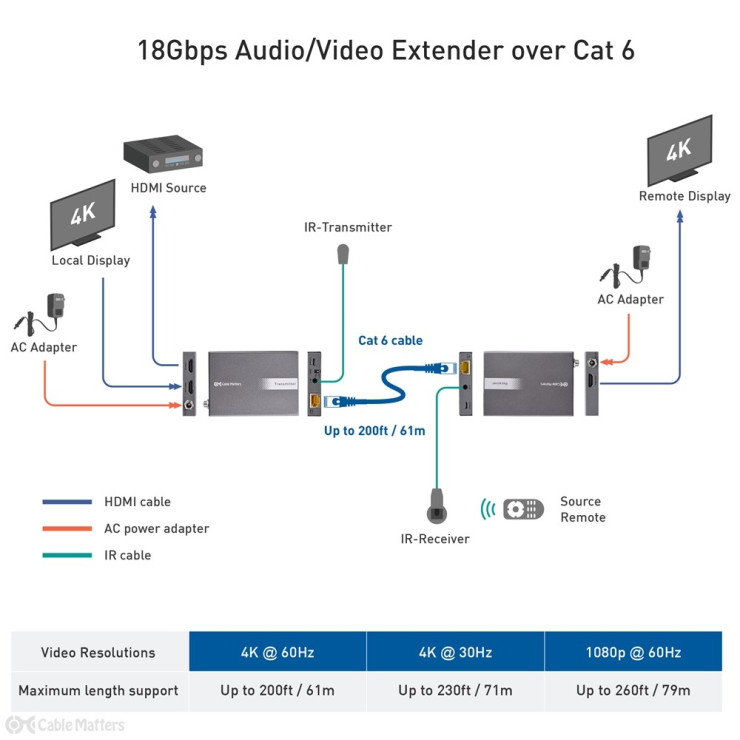
An HDMI extender takes the HDMI connection from a source in one end and converts it into an Ethernet connection using a balun, or balanced to unbalanced transformer. You can then run single, or multiple Cat 5e or Cat 6 Ethernet cables over much greater distances, and connect them to receivers on the other end. The receivers convert the signal back into an HDMI connection for connecting to the display(s). The conversion process depends on the type of extender used; some common types include those that use CAT5/6 networking cables, coaxial cables, fiber optic cables, or even wireless technology. Each type has its own set of advantages, with wired options generally providing more stable connections over longer distances, while wireless extenders offer more flexibility and ease of installation.
Utilizing HDMI extenders has numerous benefits, making them invaluable in various setups. Firstly, they enable users to set up AV systems in large homes, offices, or commercial spaces without worrying about the constraints of HDMI cable lengths. This capability is particularly useful in scenarios where the source device needs to remain hidden or far away from the display, such as in-home theaters, digital signage applications, or in situations requiring secure or remote placement of devices.
Moreover, HDMI extenders can significantly enhance the quality of presentations and entertainment setups by ensuring that the integrity of the audio and video signals is maintained over long distances. This feature is critical for maintaining immersive experiences in home theaters, clear and effective communication in corporate or educational settings and engaging visuals in retail or hospitality environments.
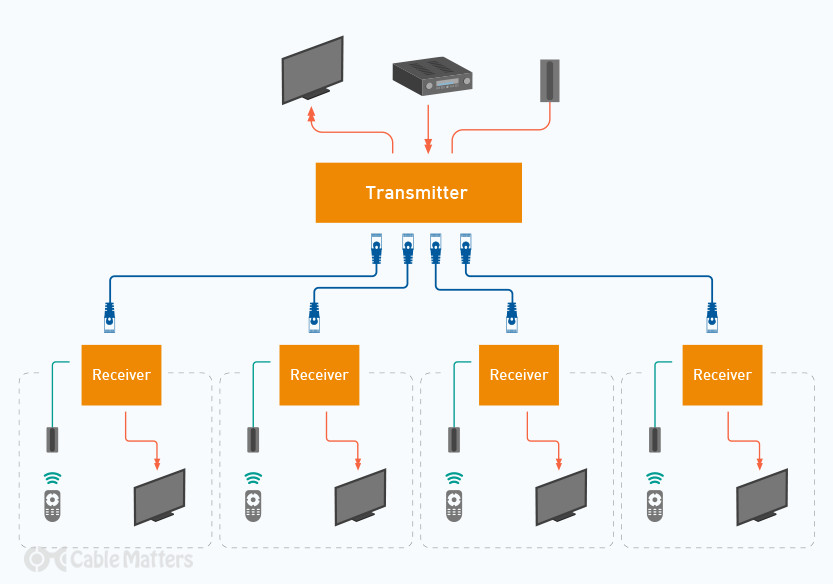
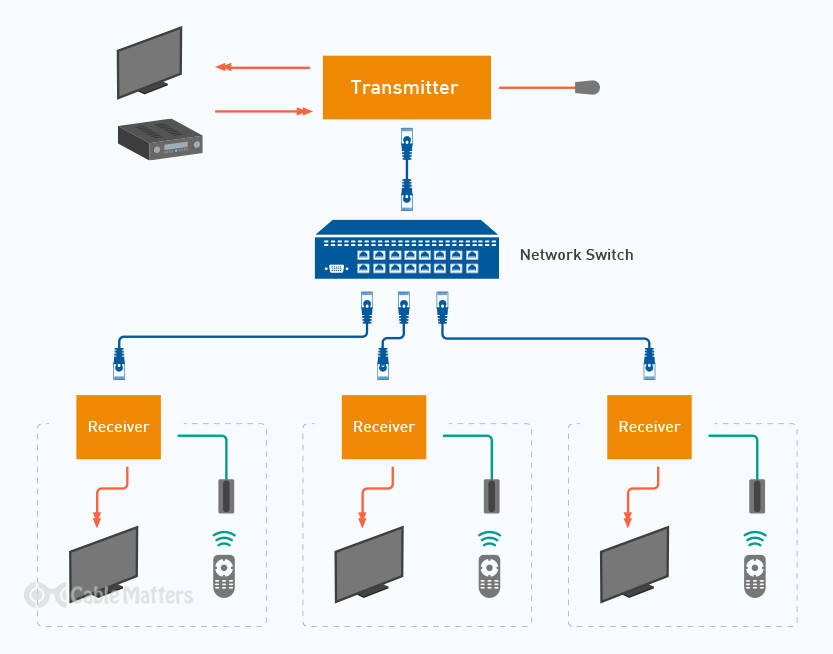
In practice, HDMI extenders function by converting the HDMI signal from the source into an Ethernet signal through a balun, enabling the transmission over greater distances using one or more CAT 5e or CAT 6 Ethernet cables to a receiver that converts it back into an HDMI signal for the display. These extenders can be directly connected with Ethernet cables or through an unmanaged network switch, offering scalability with the addition of extenders and splitters for reaching multiple displays. Some models provide outputs to four separate displays from a single source, enhancing distribution flexibility.
A notable feature of HDMI extenders is their ability to transmit infrared (IR) remote signals, allowing users to control the video source as if it were directly connected to the display via a standard HDMI connection. This feature adds a layer of convenience, enabling seamless interaction with the source content from the location of the display.
Most HDMI cables used to connect people’s TVs to Blu-ray players,
games consoles, or laptops, will be passive cables. Those can stretch a
few feet without any risk of the signal degrading, but if you want to
stretch that connection by 10 or more feet, especially with a
newer-generation standard like HDMI 2.1, you need an active HDMI cable.
Active HDMI cables use signal boosters
to enhance the HDMI signal along its length, allowing it to travel
further down longer cables without issue. But even then, HDMI 2.0 cables
can hit a maximum range of around 100ft, while an active HDMI 2.1 cable
is limited to just 25ft.
HDMI extenders, on the other hand, can handle UHD 4K video at well over 100ft, and a more standard 1080p video transmission at over 300ft, without any concern for the signal quality. They also support Dolby True HD Audio, and DTS-HD Master lossless audio across those distances, too, with no need for additional audio cables.
They can even split that signal between multiple displays, making HDMI extenders not only a great solution for transmitting to TVs a long distance from the source, they’re great for duplicating that content across multiple displays.
This can be super handy for digital signage, classrooms, boardrooms, showcasing gaming footage on a larger communal screen, or for mirroring sports footage in a bar.
If you want to expand your HDMI extender connection to more displays in the future, most splitters also support the ability to add more displays with additional receivers, too. Do note, however, that the greater the number of displays and the greater the distance and conversions between the source and the display, the greater the chance of signal attenuation.
HDMI Extender Types: Wired vs. WirelessHDMI extenders come in two primary types: wired and wireless, each serving different needs depending on the setup.
Wired HDMI extenders are known for their reliability and use physical cables to connect the source to the display. HDMI extenders over Ethernet use CAT5e or CAT6 cables which can efficiently extend HDMI signals up to 100 meters. This is ideal for use in large spaces like conference centers and schools. Generally, these products require a dedicated network infrastructure. Using shielded CAT6A cables will usually allow for longer lengths or in a high RFI/EMI area.
Another wired option is HDMI over coaxial cable extenders, which are great for long-distance transmission, up to 300 meters using existing coaxial lines in buildings. This is especially useful where Ethernet cabling is not feasible and major rewiring isn’t an option.
Wireless HDMI extenders, on the other hand, offer convenience by eliminating cables. They can face interference issues, but recent advancements have improved their performance markedly. Extenders that use Wi-Fi and Bluetooth are suitable for home use, allowing streaming of HD content without the clutter of wires and providing a clean setup.
For high-quality video transmission without cables, WHDI (Wireless Home Digital Interface) extenders are beneficial. They operate on the 5GHz frequency, which is less prone to interference and can handle 1080p video content over distances of up to 30 meters within the same room, making them ideal for home theaters and gaming setups.
Each type of HDMI extender serves its purpose well, whether it’s the consistent performance and longer range of wired extenders or the installation simplicity and neat appearance of wireless options. The choice between them depends on the specifics of your audio and video setup and what you prioritize—signal stability and range, or ease of setup and minimalism.
HDMI Extender Capabilities: Quality & RangeThe transmission range of HDMI extenders can significantly exceed the limitations of standard HDMI cables, which are generally restricted to about 10 meters (33 feet) before signal degradation. Wired HDMI extenders, using ethernet or coaxial cables, can reliably extend HDMI signals up to 100 meters (328 feet) and, in some cases, up to 300 meters (984 feet) without quality loss. Wireless HDMI extenders, while offering a more flexible and cleaner setup, typically support shorter distances, ranging from 10 meters (33 feet) to around 30 meters (100 feet), depending on the technology and environment.
The maximum range of your connection is dependent on the HDMI extender you use, the resolution and frame rate you need, how many displays you’re connecting to, and the category of Ethernet cable you use to make the connection. Some HDMI extenders offer 4k 30Hz connections to around 130 feet, and 1080p connections at up to 230 feet, while others can manage almost 330 feet for a single 1080p display.

You’ll want to use the best cabling possible to guarantee a strong signal across the most extreme of distances, with Cat 6 cables offering the best connection with most commercial HDMI extenders. It’s also important to buy cables that are foil-wrapped and properly shielded. If you plan to run the cable through the wall, make sure to opt for cables rated for such routing, otherwise, there is an increased risk of fire.
When it comes to transmission quality, HDMI extenders are designed to maintain the integrity of the HDMI signal over long distances. Most extenders support full HD (1080p), 4K, and even 8K resolutions, ensuring that high-definition content is transmitted without compromise. Besides, they can handle various formats, including 3D video and multi-channel audio, like Dolby TrueHD and DTS-HD Master Audio, providing an immersive viewing and listening experience.
Bandwidth plays a crucial role in the transmission quality of HDMI extenders, especially for higher resolutions. Extenders need to support sufficient bandwidth to handle the immense amount of data required for 4K and 8K content. Wired extenders generally offer more bandwidth and, thus, better support for high-resolution video and fast refresh rates, resulting in smoother video playback and lower latency.
Signal stability is another critical factor. Wired extenders tend to be less susceptible to interference and can provide a more stable signal over long distances. Wireless extenders, while highly convenient, can sometimes suffer from interference from other wireless devices and obstacles that may affect the signal quality.
An appealing feature of some HDMI extenders is Power Over Cable (PoC) and Power over Ethernet (PoE), which allows the extenders to be powered through the transmission cable itself. This means that only one end of the extender pair (either the transmitter or receiver) needs to be connected to a power source, simplifying installation and reducing clutter. PoC is particularly beneficial in setups where power outlets are scarce or inconveniently located relative to the source or display device.
What to Consider When Choosing an HDMI ExtenderWhen selecting an HDMI extender, various factors come into play to ensure that it meets your specific needs. Let's dive into the primary considerations to keep in mind.
The first and foremost consideration is the required extension distance. HDMI extenders can transmit signals over distances ranging from a few meters to hundreds of meters. Measure the distance between your HDMI source and the display accurately to choose an extender capable of maintaining signal quality over that length. Wired options usually offer longer ranges, while wireless extenders are suitable for shorter distances and more flexible positioning.
Resolution and refresh are also important factors to consider. If you desire a high resolution or refresh rate, the maximum distance you can extend the connection might be limited. If your requirement is 1080p video at a 60hz refresh rate, then you can extend the distance quite a bit further than if your requirement is 4K video at 60hz. Often, the equipment needed to extend 1080p (HD) video is different than the equipment needed to extend 4K (UHD) video.
HDMI extenders can vary significantly in price, influenced by their transmission range, resolution support, and additional features. Determine your budget early in the decision-making process, but also consider the potential cost-saving benefits of extenders that utilize existing cable infrastructures, such as Ethernet cabling.
Compatibility is crucial to ensure that the extender works seamlessly with your HDMI source and display devices. Check for HDCP compliance (High-bandwidth Digital Content Protection), supported resolutions, and any specific connectors or technology (such as HDMI 2.0 or HDMI 2.1) required by your devices to avoid compatibility issues.
Consider the complexity of the setup and installation process. Wired extenders may require running cables over long distances and potentially through walls, which can be labor-intensive or require professional help. Wireless extenders offer a more straightforward setup but pay attention to potential signal interference and the optimal placement for transmitters and receivers.
Choosing the right HDMI extender boils down to a balance of these considerations, tailored to your specific scenario and preferences. By assessing each factor carefully, you can ensure a successful extension of your HDMI signals that meets your quality expectations and practical necessities.
HDMI extender